Submit Article Requests

Do you have a suggestion for an article you would like to see created?
Feel free to submit this form and add your suggestions to our document board.

Please fill out the contact form below and we will reply as soon as possible.

  • Integration Hub
  • Contact Us
  • Docs home
  • Web Experiences
  • Targeting and Triggering

Event Triggering vs Event Targeting

Understand when to trigger content from events vs. target users by event history.

Updated at June 12th, 2026

Submit Article Requests

Do you have a suggestion for an article you would like to see created?
Feel free to submit this form and add your suggestions to our document board.

Please fill out the contact form with the details about the help content you'd like to see.

  • Home

  • Getting Started

    • Installation & Developers

      • Web Experiences

        • Mobile Experiences

          • Workflows

            • Analytics & Data

              • Account Management

                • Integrations

                  Table of Contents

                  Key terms Event targeting Event triggering Which one should you use?

                  Both event triggering and event targeting let you make Appcues experiences respond to what users do in your product — like uploading a file, inviting a teammate, or completing a setup step. The difference is when and how events are used.

                  Key terms

                  Triggering is the action that starts an experience. Flows can trigger when a user navigates to a URL, clicks a link in a Checklist or Launchpad, opens a permalink, advances from another Flow, or — with event triggering — at the moment a custom event fires.

                  Targeting is the set of conditions a user must meet to qualify for an experience. If a user matches the targeting rules, the experience appears based on its trigger settings (e.g., once they land on the correct URL).

                  Event targeting

                  Event targeting lets you use events as audience conditions on a Flow's targeting page — for example, "show this Flow to users who completed 'Uploaded File' in the last 7 days."
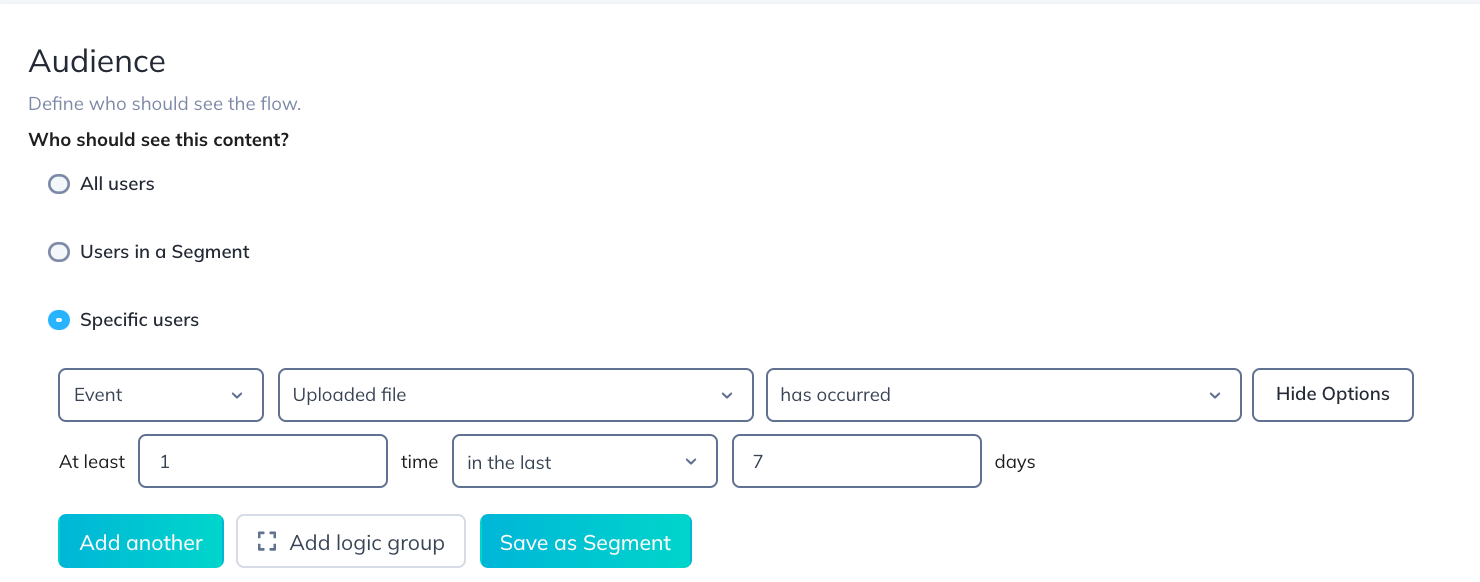
                  Appcues collects new event data on each page load. That means if a user completes the qualifying event on the current page, Appcues won't evaluate that data until the next page load. At that point the user qualifies and sees the Flow.

                  Use event targeting when you want to reach users based on their event history, and a slight delay (until the next page load) is acceptable.

                  Event triggering

                  Event triggering starts a Flow the instant a custom event fires — no page load required. If you want to show a congratulatory modal the moment someone uploads their first file, event triggering makes that possible in real time.
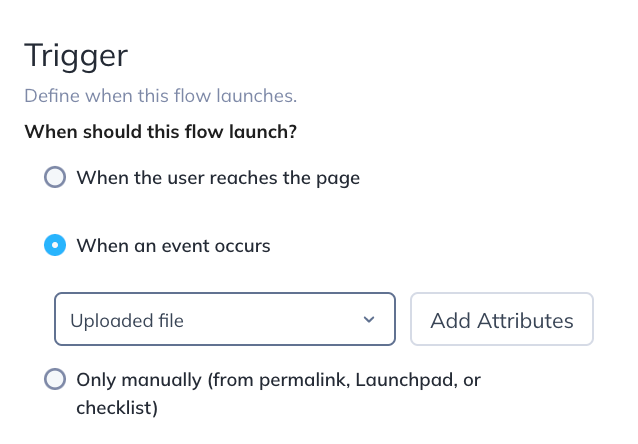
                  This is especially useful for Single Page Applications where navigation doesn't always produce page loads, or for highly behavioral experiences tied to clicks, hovers, or in-page actions.

                  Event triggering is available on select plans. Check your Account details page or contact our team for availability.

                  Learn more about setting up event triggering.

                  Which one should you use?

                    Event targeting Event triggering
                  Available on All plans Select plans
                  When it evaluates Next page load Instantly, when the event fires
                  Best for Qualifying users by past behavior Showing experiences in real time
                  Example "Users who uploaded a file this week" "Show a Flow the moment a file is uploaded"

                  You can combine both: use event targeting to narrow your audience and event triggering to control exactly when the Flow appears.

                  event targeting event triggering

                  Was this article helpful?

                  Yes
                  No
                  Give feedback about this article

                  Related Articles

                  • Trigger an Experience from an event
                  • Targeting use cases and examples
                  • Personalize experiences with user properties
                  Appcues logo

                  Product

                  Why Appcues How it works Integrations Security Pricing What's new

                  Use cases

                  Appcues Integration Hub User Onboarding Software Feature Adoption Software NPS & Surveys Announcements Insights Mobile Adoption

                  Company

                  About
                  Careers

                  Support

                  Developer Docs Contact

                  Resources

                  The Appcues Blog Product Adoption Academy GoodUX Case studies Webinar Series Made with Appcues

                  Follow us

                  Facebook icon Twitter icon grey Linkedin icon Instagram icon
                  © 2022 Appcues. All rights reserved.
                  Security Terms of Service Privacy Policy

                  Knowledge Base Software powered by Helpjuice

                  Expand