Submit Article Requests

Do you have a suggestion for an article you would like to see created?
Feel free to submit this form and add your suggestions to our document board.

Please fill out the contact form below and we will reply as soon as possible.

  • Integration Hub
  • Contact Us
  • Docs home
  • Web Experiences
  • Targeting and Triggering

Set Experiences Frequency Limit

Limit how many Flows a user sees within a given time period to avoid overwhelming them.

Updated at March 30th, 2026

Submit Article Requests

Do you have a suggestion for an article you would like to see created?
Feel free to submit this form and add your suggestions to our document board.

Please fill out the contact form with the details about the help content you'd like to see.

  • Home

  • Getting Started

    • Installation & Developers

      • Web Experiences

        • Mobile Experiences

          • Workflows

            • Analytics & Data

              • Account Management

                • Integrations

                  Table of Contents

                  What is the frequency limit? Turn on the frequency limit Override the frequency limit for an experience Common questions

                  What is the frequency limit?

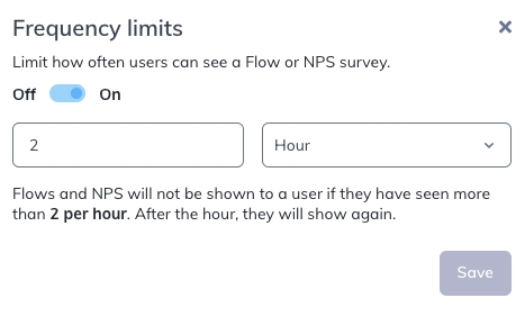
                  The frequency limit is a global throttle that caps the total number of Flows and NPS V1 surveys any single user can see across a time window. Unlike individual Flow frequency settings (which control how often one Flow appears), the frequency limit controls the combined total across all your published content.

                  Example: You have 20 Flows set to show once each. A new user could theoretically see all 20 in their first hour. With a frequency limit of 2 per hour, the user sees at most 2, and the rest are deferred.

                  The frequency limit is off by default. It applies only to Flows and NPS V1 — it does not limit Checklists, Pins, Banners, or Launchpads.
                  Turn on the frequency limit

                  1. Click Flows in the navbar, then click the ... menu and select Prioritize Flows.
                  2. Click Frequency Limits.
                  3. Set the maximum number of experiences and the time window (Minute, Hour, Day, or Week).

                  Once a user hits the limit, they won't see new Flows or NPS surveys until the time window resets. Any experiences that were blocked may become eligible again in the next window, but the next experience shown may not be one that was previously blocked.

                  Override the frequency limit for an experience

                  If a specific Flow or NPS V1 survey must show regardless of the global limit, you can override it.

                  1. Open the experience's Settings page.
                  2. Check the Override frequency limits box.

                  Overridden experiences still count toward the user's limit. If a user sees an overridden Flow first and that puts them at their cap, other non-overridden content may be blocked for the rest of the window.

                  Common questions

                  What about individual Flow frequency? 

                  The global frequency limit and individual Flow frequency are separate. To control how often a single Flow shows (for example, once per day), use the frequency setting on the Flow's own settings page. See Set Flow Frequency.

                  Do Permalinks respect the frequency limit? 

                  No. Content launched via Permalinks, Test Mode, Launchpads, or the Appcues.show() JavaScript call bypasses the frequency limit.

                  Is there a delay between experiences? 

                  No. If the limit is set to 2 per day, a user can see both Flows back to back with no enforced gap.

                  Is NPS V2 affected by frequency limit? 

                  No, frequency limits only apply to NPS V1. See Create NPS surveys.

                  experience frequency cap flows limit flows limit views maximum

                  Was this article helpful?

                  Yes
                  No
                  Give feedback about this article

                  Related Articles

                  • Configure Flow Settings
                  • Set Flow Frequency
                  • Targeting use cases and examples
                  Appcues logo

                  Product

                  Why Appcues How it works Integrations Security Pricing What's new

                  Use cases

                  Appcues Integration Hub User Onboarding Software Feature Adoption Software NPS & Surveys Announcements Insights Mobile Adoption

                  Company

                  About
                  Careers

                  Support

                  Developer Docs Contact

                  Resources

                  The Appcues Blog Product Adoption Academy GoodUX Case studies Webinar Series Made with Appcues

                  Follow us

                  Facebook icon Twitter icon grey Linkedin icon Instagram icon
                  © 2022 Appcues. All rights reserved.
                  Security Terms of Service Privacy Policy

                  Knowledge Base Software powered by Helpjuice

                  Expand