What is NPS?
Learn what NPS is, how it's calculated and when to use it.
Table of Contents
Click here to see a live NPS example 👀
NPS (Net Promoter Score) surveys measure how likely your users are to recommend your product. Appcues NPS lets you run always-on surveys that sample your user base on a rolling basis — you configure it once, and responses flow in continuously.
NPS 2.0 is the current version of NPS in Appcues. It supports multiple simultaneous surveys, localization, expanded styling, and mobile-responsive delivery. If you're still using the legacy NPS (v1), see the collapsed sections throughout this article for v1-specific details.
Using legacy NPS (v1)?
NPS v1 supports a single survey at a time, with limited styling and no localization. You can switch between v1 and v2 using the banner at the top of the NPS page in Studio.
When to use NPS
- Measure long-term customer loyalty. NPS captures overall sentiment toward your product — not satisfaction with a specific feature or interaction. Run it on a rolling cadence (quarterly, every 60 days, etc.) to track trends over time.
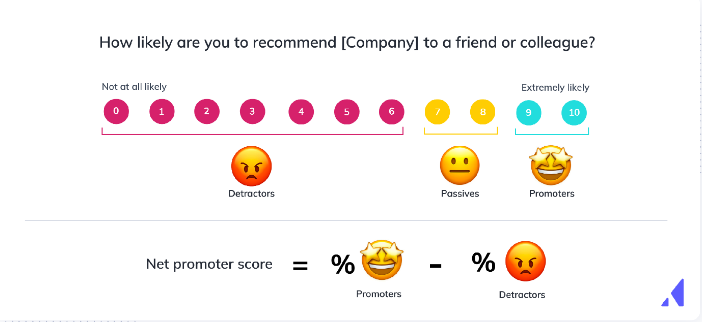
- Identify promoters and detractors. Responses automatically categorize users into promoters (9–10), passives (7–8), and detractors (0–6). Use these segments to trigger follow-up Flows — thank your promoters, dig deeper with detractors.
- Benchmark against competitors. NPS is a standardized metric. Your score is directly comparable to industry benchmarks, giving your team a clear signal on where you stand.
- Feed scores into your CRM or analytics tools. NPS responses sync to integrations like Salesforce, HubSpot, Segment, and Slack so your sales, CS, and product teams can act on the data.
NPS is not the right fit for feature-specific feedback (use a Survey embedded in a Flow instead) or one-time announcements (use a Flow or Banner).
How it works
An NPS survey has three steps that appear to the end user:
- The score question asks "On a scale of 0–10, how likely are you to recommend [product] to a friend or colleague?" The user selects a number. You can customize the question text and the endpoint labels ("Not likely" / "Very likely").
- The feedback question appears after the user submits a score. It asks an open-ended follow-up like "Why did you choose that score?" This step is optional — users can skip it.
- The snooze option ("Ask me later") lets users dismiss the survey temporarily. The survey reappears after a configurable delay (default: 7 days). In NPS 2.0, you can also track an event or update a user property when someone snoozes.
How the score is calculated
Your NPS score equals the percentage of promoters minus the percentage of detractors. Passives are excluded from the calculation.
- Promoters (9–10): Loyal users likely to recommend your product.
- Passives (7–8): Satisfied but unenthusiastic — vulnerable to competitors.
- Detractors (0–6): Unhappy users who may discourage others from using your product.
The score ranges from −100 (all detractors) to +100 (all promoters). Appcues calculates this automatically using a trailing 30-day window so the score stays current without sharp spikes.
Example: 1,200 responses — 400 promoters (33%), 600 passives, 200 detractors (17%). Your NPS = 33% − 17% = 16.
How NPS interacts with other experiences
Appcues renders one experience at a time. If a user qualifies for both a Flow and an NPS survey simultaneously, the Flow takes priority. NPS only appears when no other qualified experience is pending.
This applies across both NPS v1 and NPS 2.0 — Appcues will not show a v1 and v2 NPS at the same time.
What's different in NPS 2.0
| Capability | NPS v1 | NPS 2.0 |
|---|---|---|
| Simultaneous surveys | One at a time | Multiple |
| Localization | Manual (contact support) | Self-serve: manual, file upload, or AI translation |
| Label editing ("Not likely", "Ask me later") | Not editable in the UI (contact support) | Fully editable |
| Mobile responsiveness | Mobile blocked by default | Responsive by default |
| Styling options | Color theme + dark/light toggle | Expanded color and layout controls |
| Event model |
appcues:nps_score / appcues:nps_feedback events |
appcues:v2:step_interaction with interactionType: "Survey submitted" and surveyResponses[].type: "nps_score"
|
| Analytics | Aggregate NPS dashboard with rolling 30-day score | Aggregate NPS dashboard with rolling 30-day score + Flow/Step specific analytics page |
Common questions
Can I run NPS v1 and v2 at the same time?
Yes. You can keep your v1 survey live while testing a v2 survey. Toggle between them using the banner at the top of the NPS page in Studio. Appcues will only render one NPS survey at a time to any given user.
Does NPS work on mobile web?
In NPS 2.0, yes — the survey is responsive by default. In v1, mobile devices are excluded from targeting by default.
How is NPS different from a survey embedded in a Flow?
NPS measures overall product loyalty using a standardized 0–10 scale. Surveys in Flows collect feature-specific or contextual feedback using custom question types (text fields, multiple choice, ratings). They're complementary — use NPS for the big-picture metric and surveys for targeted feedback. See Surveys & Forms.
Can I follow up with users based on their NPS score?
Yes. When a user submits a score, Appcues captures it as a user property ("Most Recent NPS Score"). Create Promoter, Passive, and Detractor segments using this property, then target follow-up Flows to each segment. See Target Flows based on NPS scores.
Can I use NPS for localized content?
Yes. NPS 2.0 support multiple locales and RTL layout direction from the builder.